Multiple Maps On a Single Page with jQuery
March 26, 2015
TL;DR
This guide details an efficient method for displaying multiple Google Maps on one page by utilizing a jQuery implementation that relies entirely on HTML data attributes for location data.
- Locations are specified in the HTML markup using custom data-lat and data-lng attributes, decoupling coordinates from the script.
- The jQuery code dynamically selects and iterates over all target map containers using an ID prefix selector (e.g., div[id^="map-"]).
- The script reads the coordinates from these attributes, allowing it to automatically initialize a new map instance for every matching container.
- The system is scalable; adding new maps only requires adding the corresponding HTML attributes, requiring no changes to the main JavaScript function.
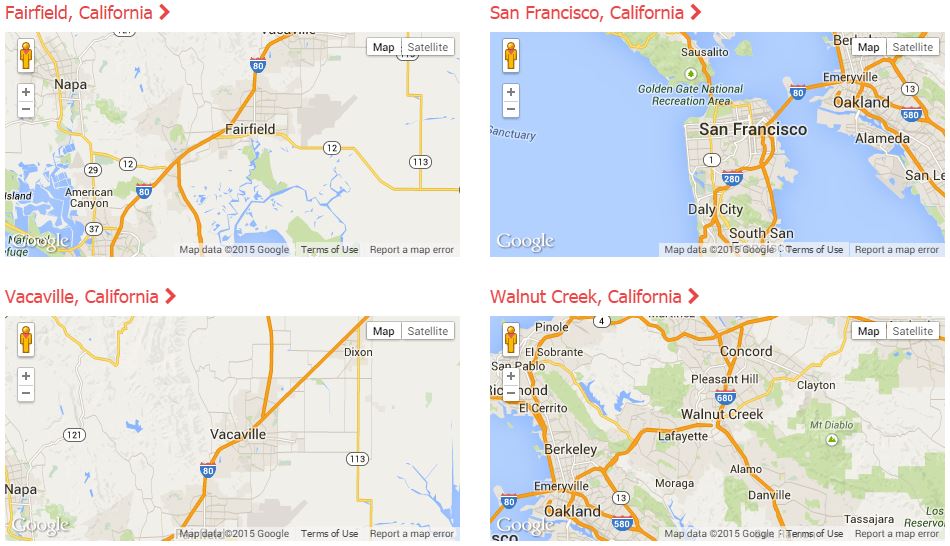
I recently added a "locations" page to my website and was looking for a simple way to display multiple maps (Google Maps) on the page for the corresponding locations, without having to do a ton of coding or having to maintain a lot of JavaScript.
What I decided on was a simple jQuery implementation that uses data- elements to supply latitude (lat) and longitude (lng) vales for the map rendering.
The idea was that I could setup many div elements that should contain maps and place them all over the page and not have to worry about updating script code or anything like that to accommodate the display of them.
So, for example, I use the following HTML to show a map centered on San Francisco, CA (lat: 37.7577, Lng: -122.4376).
<div
	id="map-sf"
	style="width: 100%; height: 225px; max-width: 500px;"
	data-lat="37.7577"
	data-lng="-122.4376">
</div>
And the corresponding JavaScript:
function loadMapAPI() {
	var script = document.createElement('script');
	script.type = 'text/javascript';
	script.src = 'https://maps.googleapis.com/maps/api/js?key=API_KEY&callback=mapInit';
	document.body.appendChild(script);
}

function mapInit() {
	(function ($) {
		$('div[id^="map-"]').each(function (index) {
			try {
				var m = $(this);

				var lat = m.attr('data-lat');
				var lng = m.attr('data-lng');

				var options = {
					center: new google.maps.LatLng(lat, lng),
					zoom: 10,
					mapTypeId: google.maps.MapTypeId.ROADMAP
				};
				var map = new google.maps.Map(m.get(0), options);
			} catch (e) { alert(e); }
		});
	})(jQuery);
}

(function ($) {
	$(window).load(loadMapAPI);
})(jQuery);
This code loads the Google Maps API (asynchronously) and then looks for any div containers that have an ID that starts with map- (like the example). You could set the jQuery up to use whatever selector you want, the ID based selector just worked for the code I already had implemented.
The jQuery code then picks up the lat/lng from the corresponding data-lat and data-lng attributes.
Note: You may want to put in some more advanced error checking if you are unsure of your data, but for this implementation, I'm keeping it simple.
To expand the code, you could also optionalize things like the zoom level and the map type by adding more data- elements... if you needed to optionalize that stuff.
All of the code together looks something like this,
<html>
<head>
	<script type="text/javascript">
		function loadMapAPI() {
			var script = document.createElement('script');
			script.type = 'text/javascript';
			script.src = 'https://maps.googleapis.com/maps/api/js?key=API_KEY&callback=mapInit';
			document.body.appendChild(script);
		}

		function mapInit() {
			(function ($) {
				$('div[id^="map-"]').each(function (index) {
					try {
						var m = $(this);

						var lat = m.attr('data-lat');
						var lng = m.attr('data-lng');

						var options = {
							center: new google.maps.LatLng(lat, lng),
							zoom: 10,
							mapTypeId: google.maps.MapTypeId.ROADMAP
						};
						var map = new google.maps.Map(m.get(0), options);
					} catch (e) { alert(e); }
				});
			})(jQuery);
		}

		(function ($) {
			$(window).load(loadMapAPI);
		})(jQuery);
	</script>
</head>
<body>
	<div id="map-sf" style="width: 100%; height: 225px; max-width: 500px;" data-lat="37.7577" data-lng="-122.4376"></div>
</body>
</html>
* Make sure you update the "API_KEY" with your API Key from Google. You can get one from the Google Developers Console if you don't have one.